The Participant Settings function allows Admins to assign roles to colleagues within their firm. Explore the varying levels of authorization associated with different roles below.
About roles and permissions
• IPEM User: can only access their own profile.
• Event participant: can access event database (only during an event period), can consult and edit their own profile, and consult their firm’s profile.
Roles details
Every role benefits from the rights of an IPEM User or an Event Participant. However, specific permissions can be attributed to individuals to manage different parts of the experience.
A firm’s first user is automatically attributed the role of Admin. The Admin can add and remove roles to their firm’s employees. Learn more about your team’s registration.
• Admin — can access and/or edit:
- Firm Profile Management: You can view and edit your company’s profile information.
- User Role Management: You can assign/remove Admin roles to other members of your firm who have an account on the platform.
- Event participation management: For each event your firm is attending, you must add Event Managers who will help coordinate your participation and receive all logistics details.
- Invoices: You have access to all invoices related to your firm.
• Event Manager — can access and edit:
- Firm Profile Management: You can view and edit your company’s profile information.
- Firm’s event participants and their profiles
How to assign an Event Manager
Team registration
1. ATTRIBUTING EVENT PASSES TO TEAMMATES
a. Access your IPEM Account using your email address.
b. Navigate to the event section using the navigation bar on the left to select one of the IPEM events.
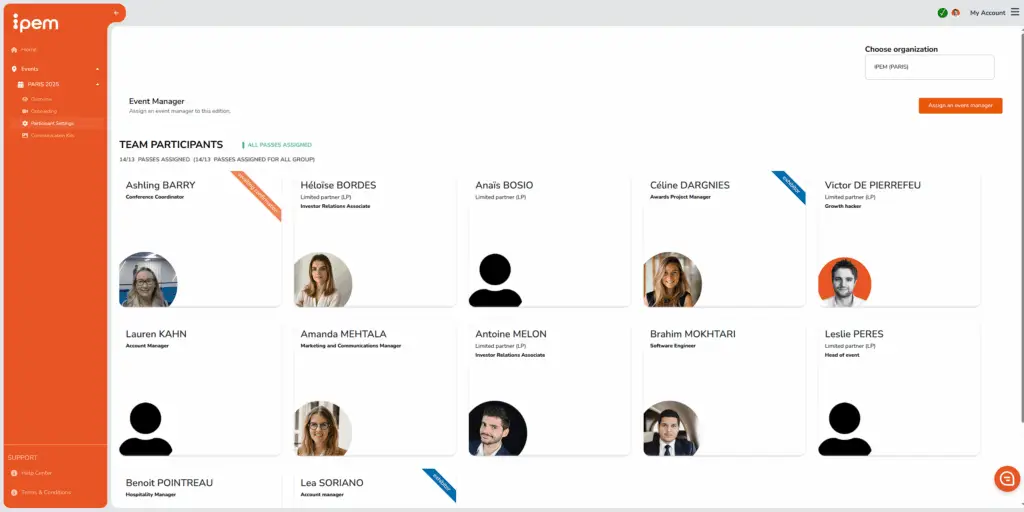
c. Look for the Participant Settings on the left menu.
d. Check the number of passes available for your firm.
e. Click on ASSIGN A PASS.
f. After you’ve assigned a pass to one or more colleagues, the IPEM Team will review your request as soon as possible.
2. MODIFYING COLLEAGUE’S PARTICIPATION AND RECOVERING PASSES
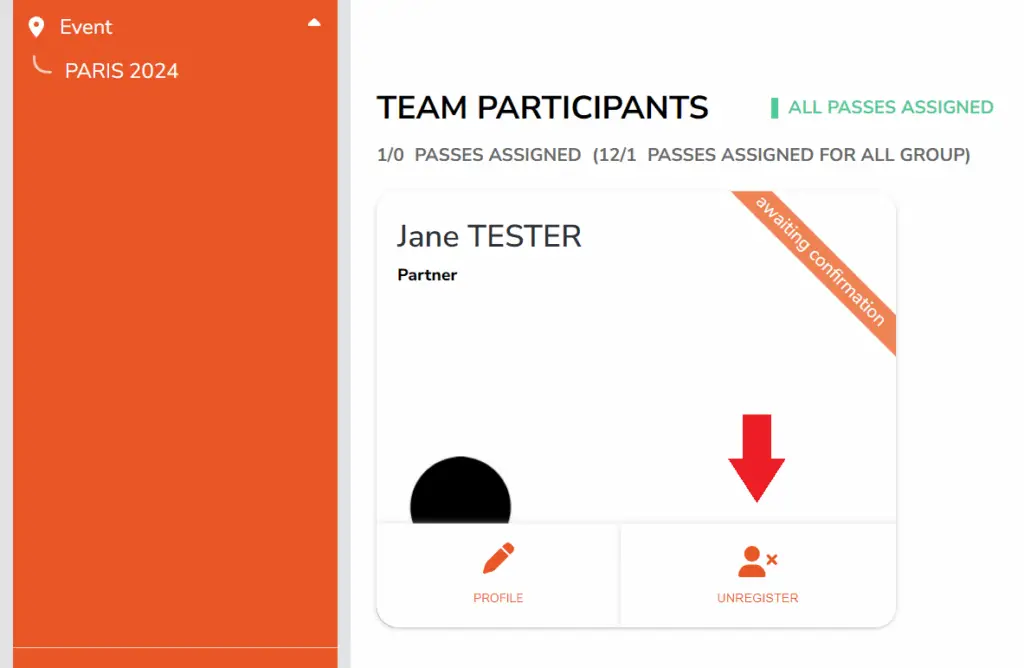
a. On the Participant Settings tab, locate the teammate’s profile in the list of registered team members.
b. Hover over your teammate’s profile to access actions.
c. Click on UNREGISTER. Their passes will be made available for reassignment.
3. MANAGE THE PASSES OF YOUR FIRM’S SUBSIDIARIES DIRECTLY VIA YOUR IPEM ACCOUNT
Only the parent firm’s Admin has access to this feature.
a. Once you have logged in with your professional email address, click on the orange sidebar on the left of your screen and then go the Participant Settings options.
b. At the top right of this page, you will see a drop-down menu: Choose organization. Click on it and select the subsidiary to which you wish to assign your passes.
c. You will then see the number of passes assigned by the subsidiary just below each subsidiary.
Don’t hesitate to contact us if you need any further information.